Support#
Welcome to XR Twin Support 🛠️! We're dedicated to providing you with the best possible experience while using our software. Whether you have questions, encounter technical issues, or need assistance with any aspect of XR Twin, our support team is here to help.
Contact Information
If you encounter any issue or have questions, please reach out to us directly at xrtwin-support@ls-group.fr.
Accessing Log Files
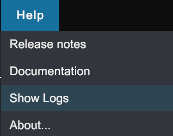
You can easily access the log files via the menu Help / Show Logs. This will open the %appdata%/../LocalLow/LSGROUP/XR Twin/ folder directly. In this folder, you will find two log files:
- player.log: This is the log file from your current or most recent XR Twin session. It contains all events, messages, and errors that occurred during the latest execution of the application.
- player-prev.log: This is the log file from your previous XR Twin session. It contains the data from the session before the current one.
These log files contain a lot of useful data that can greatly improve our resolution time for your issue. Please attach both files when submitting a support ticket, as they provide valuable diagnostic information to help us identify and resolve any problems you may be experiencing.
How We Can Help
Our support team is available to assist you with a wide range of inquiries, including but not limited to:
- Technical Support: Encountering difficulties with XR Twin? Our technical experts are here to troubleshoot issues, provide guidance, and help you get back on track.
- General Inquiries: Have questions about XR Twin's features, capabilities, or usage? Feel free to reach out to us for clarification and assistance.
- Feedback and Suggestions: Your feedback is invaluable to us! Whether you have suggestions for improvement or simply want to share your thoughts on XR Twin, we'd love to hear from you.